
Mastering SQL Database in Microsoft Fabric: Features, Insights & Best Practices
In the fast-paced world of database technologies, Microsoft Fabric introduces a revolutionary take with its SQL database. This fully integrated, developer-friendly operational database is built on Azure SQL Database’s robust engine, combining transactional processing with seamless analytics capabilities. Organizations now have a unified solution to simplify database management and analytics—an essential need in today’s data-driven environment.
Why does this matter now? As businesses handle exponentially growing datasets, the challenge is bridging transactional and analytical workflows without creating silos. SQL Database in Microsoft Fabric not only automates data replication for analytics but also offers a serverless, SaaS-based model that simplifies operations, reduces costs, and accelerates insights.
What Is SQL Database in Microsoft Fabric?
At its core, SQL Database in Microsoft Fabric is an operational database designed for transactional workloads (OLTP). Built on the Azure SQL Database engine, it provides:
- Serverless compute for dynamic scaling.
- SaaS simplicity to minimize administrative overhead.
- Automatic mirroring of data to Fabric’s OneLake for near real-time analytics.
- Multi-model support for relational, graph, JSON, and key-value data.
This combination makes it ideal for organizations looking to unify operational data with analytics without piecing together disparate tools.
Key Features
- Integration with Microsoft Fabric: Tight integration with the Fabric ecosystem enables seamless collaboration with tools like Power BI, Spark, and Notebooks. Delta tables in OneLake ensure analytics-ready data.
- SaaS Foundation: The platform is fully serverless, operating under the Fabric Capacity Model for dynamic scalability.
- Built on Azure SQL Database: It inherits features like data compression, partitioning, and row-level security from Azure SQL Database.
- SQL Analytics Endpoint: Enables cross-database queries and analytics on mirrored data via a read-only TDS connection.
- Automatic Data Mirroring: Replicates data in Delta format to OneLake, supporting broader access and analytics workflows.
Getting Started for Beginners
If you’re new to SQL databases or Microsoft Fabric, here’s how to get started:
1. Provisioning a Database
- Log in to the Fabric portal.
- Navigate to the Databases section and select “SQL Database”.
- Choose a pre-configured capacity model for your workload.
2. Loading Sample Data
- Use the AdventureWorksLT schema to explore database structures and run sample queries. Below is an example query to fetch customer data:
SELECT CustomerID, FirstName, LastName
FROM SalesLT.Customer
WHERE CompanyName IS NOT NULL;
3. Exploring with the Web-Based Editor
The Fabric portal offers an intuitive T-SQL editor for querying data. Beginners can also visualize data directly from the editor’s interactive interface, helping them understand query outputs effectively.
Intermediate Workflows and Tools
For users familiar with SQL, Microsoft Fabric enhances productivity with the following:
1. T-SQL Compatibility
Leverage existing SQL skills to build complex queries, stored procedures, and views. For instance, creating an indexed table can significantly improve query performance:
CREATE TABLE ProductInventory (
    ProductID INT NOT NULL,
    LocationID INT NOT NULL,
    Quantity INT NOT NULL,
    LastUpdated DATETIME NOT NULL DEFAULT GETDATE(),
    CONSTRAINT PK_ProductInventory PRIMARY KEY (ProductID, LocationID)
);

CREATE INDEX IX_ProductQuantity ON ProductInventory (Quantity);
2. Analytics Integration
- Execute cross-database queries across OneLake and other Fabric databases. For example:
SELECT *
FROM FabricDatabase1.dbo.SalesData AS A
JOIN FabricDatabase2.dbo.InventoryData AS B
ON A.ProductID = B.ProductID;
- Prepare data for machine learning workflows using Spark pipelines and notebooks.
3. Git and Deployment Pipelines
Fabric’s built-in Git integration lets you:
- Track database object changes.
- Automate schema deployment using Fabric Deployment Pipelines.
4. GraphQL API Creation
Users can generate GraphQL APIs for SQL databases directly within the Fabric portal, enabling flexible, API-driven workflows.
Advanced Implementation and Use Cases
Architecture and Scalability
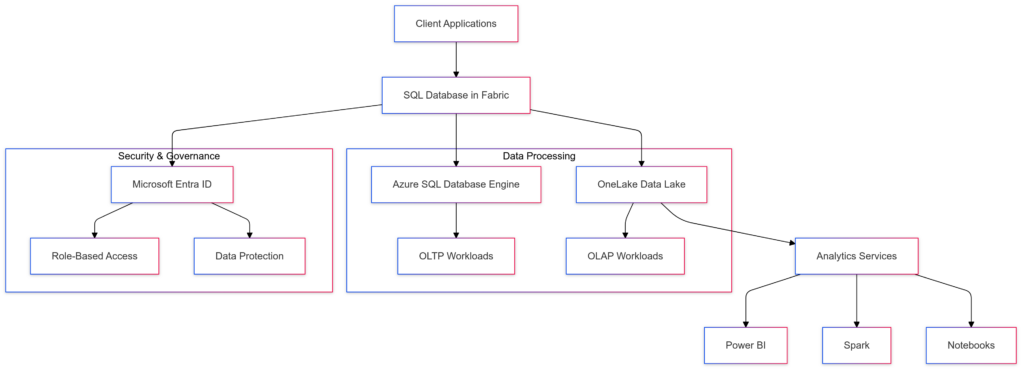
- Serverless Compute: Scales dynamically, reducing the need for manual provisioning.
- Data Mirroring: Automatically replicates data to OneLake in near real-time, ensuring analytics readiness.
Performance Monitoring
- Key Metrics:
- Query execution time.
- CPU utilization per query.
- OneLake mirroring performance.
- Optimization Tips:
- Use indexed views for aggregated data.
- Analyze execution plans to identify bottlenecks.
Example Query Optimization:
SELECT ProductID, SUM(SalesAmount) AS TotalSales
FROM SalesData
GROUP BY ProductID
ORDER BY TotalSales DESC
OPTION (HASH GROUP, MAXDOP 4);
- Tools:
- Performance Dashboard for real-time insights.
- Capacity Metrics App for resource utilization.
Real-World Use Cases
- E-commerce Analytics:
- Scenario: A retail company uses SQL Database in Fabric to track real-time sales, inventory levels, and customer behavior.
- Benefit: Automated data mirroring to OneLake enables seamless integration with Power BI, providing near-instantaneous sales insights.
- IoT Sensor Data Monitoring:
- Scenario: A manufacturing firm monitors IoT sensor data from factory equipment to predict failures and optimize performance.
- Benefit: Fabric’s scalability supports large volumes of sensor data while enabling predictive analytics through Spark and Power BI.
- Financial Reporting and Forecasting:
- Scenario: A financial institution uses Fabric to consolidate transactional data and generate reports for compliance and forecasting.
- Benefit: SQL Analytics Endpoint supports complex cross-database queries, reducing manual data preparation time.
- Healthcare Analytics:
- Scenario: A healthcare provider integrates patient data and analytics to improve patient care and streamline operations.
- Benefit: Secure role-based access via Microsoft Entra ensures data privacy while enabling comprehensive analytics.
Comparison: SQL Database in Microsoft Fabric vs. Alternatives
When choosing a database platform, it’s crucial to evaluate its capabilities, integration potential, and suitability for specific use cases. Below, we compare SQL Database in Microsoft Fabric with Azure SQL Database, Snowflake, Amazon Redshift, and Google BigQuery, emphasizing operational databases and analytics platforms.
1. SQL Database in Microsoft Fabric vs. Azure SQL Database
Feature
SQL Database in Fabric
Azure SQL Database
Compute Model
Serverless-only, scales dynamically
Serverless or provisioned (vCore/DTU-based)
Data Mirroring
Automatic mirroring to OneLake for analytics
No built-in mirroring; manual ETL to a data lake
Integration
Native integration with Power BI, OneLake, and Fabric
Broader integrations with Azure ecosystem
Cross-Database Queries
Supported via SQL Analytics Endpoint
Limited; requires Elastic Queries or custom setup
Pricing
Fabric Capacity Model; simplified serverless pricing
Usage-based, flexible but complex tiers
Analytics Focus
Combines OLTP and OLAP seamlessly
Primarily optimized for OLTP
Deployment Model
Fully managed SaaS
Fully managed SaaS
Recommendation: Use Fabric for unified analytics and operational database needs. Azure SQL Database may be more suitable for pure OLTP workloads without analytics integration.
2. SQL Database in Microsoft Fabric vs. Snowflake
Feature
SQL Database in Fabric
Snowflake
Compute Model
Serverless, pay-as-you-go
Compute clusters (warehouses)
Storage
Integrated with OneLake
Decoupled; uses external storage (e.g., S3)
Analytics Integration
Seamless with Power BI, Spark, Notebooks
Integrated but requires external tools (e.g., Tableau)
Data Formats
Supports Delta format via OneLake
Supports Parquet, ORC, and others
Query Performance
Optimized for mixed OLTP and OLAP workloads
Primarily OLAP, optimized for large-scale analytics
Cost Management
Fabric Capacity Model simplifies budgeting
Compute-storage separation adds flexibility but complexity
Security
Built-in Microsoft Entra authentication
Strong access controls, encryption
Recommendation: Snowflake excels in large-scale, OLAP-focused analytics, while SQL Database in Fabric is ideal for mixed OLTP-OLAP workloads with seamless Power BI integration.
3. SQL Database in Microsoft Fabric vs. Amazon Redshift
Feature
SQL Database in Fabric
Amazon Redshift
Compute Model
Serverless
Provisioned or serverless clusters
Integration
Native integration with Fabric tools (Power BI, Spark)
Integrates well with AWS ecosystem (Athena, S3)
Query Performance
Mixed OLTP-OLAP workloads
Optimized for OLAP
Data Mirroring
Automatic to OneLake
Requires ETL for external analytics
Security
Built-in Entra ID and row-level security
AWS IAM, KMS encryption
Cost
Simplified Fabric pricing
Pay-as-you-go with cluster-specific pricing
Recommendation: Redshift is suitable for AWS-heavy environments focusing on OLAP, while SQL Database in Fabric is better for mixed workloads within the Microsoft ecosystem.
4. SQL Database in Microsoft Fabric vs. Google BigQuery
Feature
SQL Database in Fabric
Google BigQuery
Compute Model
Serverless
Serverless, on-demand
Data Integration
Seamless with Microsoft Fabric
Best for Google Cloud ecosystem
Query Optimization
Combines OLTP and OLAP seamlessly
Focused on OLAP and data warehousing
Storage
Integrated with OneLake
Decoupled; uses Google Cloud Storage
Cost Efficiency
Fabric Capacity Model, predictable
Pay-per-query pricing, scalable
Security
Built-in Entra authentication
Google IAM, encryption
Recommendation: BigQuery is an excellent choice for data warehousing within Google Cloud, while SQL Database in Fabric provides more versatility across mixed workloads.
Key Takeaways
Azure SQL Database remains optimal for pure OLTP scenarios or when deeper customization within the Azure ecosystem is required.
Choose SQL Database in Microsoft Fabric if you need a unified operational and analytical database tightly integrated with tools like Power BI and a serverless, simplified cost structure.
Opt for Snowflake, Redshift, or BigQuery if your primary focus is large-scale OLAP, or you require tighter integration with AWS or Google ecosystems.
Migration and Implementation Strategies
1. Migration Guide
- Assess Workloads: Identify workloads suitable for SQL Database in Fabric.
- Use Tools: Employ tools like Azure Data Migration Assistant (DMA) and SqlPackage for schema and data migration.
- Resolve Schema Conflicts: Adapt schemas to align with Fabric’s supported features.
2. Migration Checklist
- Perform schema analysis.
- Map unsupported features and replace them.
- Validate data integrity post-migration using queries like:
SELECT COUNT(*) AS RecordCount
FROM SourceTable
WHERE NOT EXISTS (
    SELECT 1
    FROM TargetTable
    WHERE SourceTable.KeyColumn = TargetTable.KeyColumn
);
3. Cost Estimation
SQL Database in Fabric operates under the Fabric Capacity Model, with serverless pricing that scales dynamically based on usage.
Security and Governance
1. Microsoft Entra Authentication
Role-based authentication ensures secure access to database objects.
2. Granular Access Control
- Implement row-level security and database-level roles to enforce access policies.
- Leverage Microsoft Purview to label sensitive data and define governance rules.
3. Data Protection
Fabric uses service-managed keys for data encryption. While customer-managed keys aren’t supported, mirrored data in OneLake benefits from built-in encryption.
Best Practices
1. Schema Optimization
- Use supported data types to ensure seamless mirroring to OneLake.
- Avoid unsupported features in critical workloads.
2. Performance Tuning
- Regularly monitor performance dashboards.
- Optimize queries with indexes and execution plan analysis.
3. Backup and Recovery
- Utilize OneLake mirrored data as a backup strategy.
- Plan disaster recovery workflows around Fabric’s replication model.
Conclusion: The Future of Operational Databases
SQL Database in Microsoft Fabric bridges the gap between transactional processing and real-time analytics, making it a game-changer for modern organizations. With its serverless architecture, seamless integrations, and robust security, it caters to diverse use cases across industries. Whether you’re a beginner exploring SQL, an intermediate user optimizing workflows, or an advanced developer implementing enterprise-grade solutions, Microsoft Fabric provides the tools you need. Start your journey with SQL Database in Microsoft Fabric today. Explore its capabilities, optimize your workflows, and redefine how you manage data. Dive deeper into documentation, set up your first database, and experience the power of unified operational and analytical workloads.
References
- Microsoft Fabric Documentation
- Azure SQL Database Engine Overview
- OneLake in Microsoft Fabric
- SQL Analytics Endpoint
- AdventureWorksLT Sample Database
- Azure Data Migration Assistant
- SqlPackage Command-Line Tool
- Microsoft Entra ID
Related Articles
- AI and Automation
Chroma Vector Database: The Open-Source Foundation for AI Search

- Cloud Database Solutions
Mastering SQL Database in Microsoft Fabric: Features, Insights & Best Practices
Explore the SQL database in Microsoft Fabric, covering its architecture, integrations, T-SQL compatibility, autonomous features, and use cases for analytics.
- AI Search
The Crawl-to-Refer Ratio: Measuring AI's Impact on Your Website Traffic
Learn how AI search engines crawl your content thousands of times per referral. Understand Cloudflare's new Crawl-to-Refer Ratio metric and build tools to measure your site's AI bot impact.
Discussion
Loading discussion...