

TL;DR: Chroma vector database is an open-source embedding store built for AI applications. It handles tokenization, embedding generation, and similarity search automatically—three lines of code from install to query. Supports Python and JavaScript, integrates with LangChain and LlamaIndex, offers multimodal search via OpenCLIP, and provides Chroma Cloud for serverless deployments. Best suited for RAG pipelines, semantic search, and rapid AI prototyping.
Every significant technology arrives when its moment demands it. Relational databases emerged when businesses needed structured records. Document stores appeared when the web required flexibility. Now, as artificial intelligence reshapes how we interact with information, a new category has become essential: the vector database.
The Chroma vector database represents the open-source response to this need. Where traditional databases excel at exact matches—find all customers named “Smith”—vector databases answer a fundamentally different question: find everything similar to this concept. This distinction, seemingly small, enables semantic search, recommendation engines, and the retrieval-augmented generation (RAG) systems powering modern AI assistants.
Chroma’s philosophy is refreshingly simple. If you can write three lines of Python, you can have a working vector database. No schemas to define, no clusters to configure, no credentials to manage. The complexity exists, of course, but it remains hidden beneath an interface designed for developers who would rather build applications than manage infrastructure.
Getting Started with Chroma Vector Database
Installation requires a single command:
pip install chromadbA complete working example follows:
import chromadb

client = chromadb.Client()
collection = client.create_collection("documents")

collection.add(
    documents=[
        "Artificial intelligence is transforming healthcare diagnostics",
        "Machine learning models predict patient outcomes with increasing accuracy",
        "Neural networks analyze medical imaging faster than radiologists"
    ],
    ids=["doc1", "doc2", "doc3"]
)

results = collection.query(
    query_texts=["AI applications in medicine"],
    n_results=2
)
This code creates a collection, adds three documents, and queries for semantically similar content. Chroma handles everything between: tokenizing text, generating embeddings via Sentence Transformers, indexing with HNSW, and returning ranked results. The query “AI applications in medicine” finds relevant documents despite sharing no exact words with them.
How Chroma Vector Database Works
Understanding requires examining three layers: embeddings, indexing, and storage.
Embeddings transform text into numerical representations. The sentence “The cat sat on the mat” becomes a vector of 384 floating-point numbers (using the default model). These numbers encode semantic meaning—similar concepts cluster together in this high-dimensional space. Chroma uses the all-MiniLM-L6-v2 model by default, though you can substitute alternatives.
Indexing makes search tractable. Comparing a query against millions of vectors through brute force would be prohibitively slow. Chroma employs HNSW (Hierarchical Navigable Small World), an algorithm that constructs a graph where similar vectors connect as neighbors. Queries traverse this graph efficiently, achieving logarithmic rather than linear time complexity.
Storage combines SQLite for metadata with a custom binary format for vectors. This architecture makes Chroma remarkably portable—copy one directory and you’ve migrated your entire database.
# Persistent storage
client = chromadb.PersistentClient(path="./chroma_db")

# Data survives restarts
collection = client.get_or_create_collection("persistent_docs")
Configuring Embedding Functions
Production systems often require specific embedding models. Chroma supports pluggable embedding functions for all major providers:
from chromadb.utils.embedding_functions import OpenAIEmbeddingFunction

openai_ef = OpenAIEmbeddingFunction(
    api_key="your-api-key",
    model_name="text-embedding-3-small"
)

collection = client.create_collection(
    name="openai_embeddings",
    embedding_function=openai_ef
)
Supported providers include OpenAI, Cohere, HuggingFace Transformers, Google PaLM, and custom implementations. Each collection maintains its own embedding function, allowing different models for different use cases within the same database.
For teams building LLM-powered applications, this flexibility proves essential. Customer-facing search might use OpenAI’s latest model for quality, while internal tools use local models for cost efficiency.
Multimodal Search with OpenCLIP
Text represents only one modality. The Chroma vector database supports multimodal collections through OpenCLIP, enabling unified search across text and images:
from chromadb.utils.embedding_functions import OpenCLIPEmbeddingFunction
from chromadb.utils.data_loaders import ImageLoader

multimodal_collection = client.create_collection(
    name="images_and_text",
    embedding_function=OpenCLIPEmbeddingFunction(),
    data_loader=ImageLoader()
)

# Add images by file path
multimodal_collection.add(
    ids=["img1", "img2", "img3"],
    uris=[
        "photos/beach_sunset.jpg",
        "photos/mountain_peak.jpg",
        "photos/city_skyline.jpg"
    ]
)

# Query with natural language
results = multimodal_collection.query(
    query_texts=["peaceful ocean view at dusk"],
    n_results=2
)
CLIP embeddings project both text and images into a shared vector space. The query “peaceful ocean view at dusk” retrieves the sunset beach photo despite no textual labels existing. This capability transforms how applications handle visual content—no manual tagging, no computer vision pipelines, just semantic understanding.
Metadata Filtering for Precision
Semantic similarity alone sometimes retrieves too broadly. A query about “revenue growth” might return documents from any department or year. Metadata filtering constrains results:
collection.add(
    documents=[
        "Q3 revenue exceeded projections by 12%",
        "Marketing spend increased customer acquisition",
        "Engineering headcount grew to support product roadmap"
    ],
    metadatas=[
        {"department": "finance", "quarter": "Q3", "year": 2024},
        {"department": "marketing", "quarter": "Q3", "year": 2024},
        {"department": "engineering", "quarter": "Q3", "year": 2024}
    ],
    ids=["fin_q3", "mkt_q3", "eng_q3"]
)

# Semantic search with filters
results = collection.query(
    query_texts=["budget and spending analysis"],
    where={"department": {"$in": ["finance", "marketing"]}},
    where_document={"$contains": "revenue"},
    n_results=5
)
Filter operators include equality, comparisons ($gt, $lt, $gte, $lte), membership ($in, $nin), and logical combinations ($and, $or). Filters apply before similarity ranking, reducing the candidate set for efficient querying.
Integration with LangChain and LlamaIndex
Modern AI applications rarely use vector databases in isolation. Chroma integrates natively with the frameworks orchestrating RAG pipelines and agentic workflows.
LangChain Integration:
from langchain_chroma import Chroma
from langchain_openai import OpenAIEmbeddings

vectorstore = Chroma.from_documents(
    documents=split_docs,
    embedding=OpenAIEmbeddings(),
    persist_directory="./langchain_chroma"
)

retriever = vectorstore.as_retriever(
    search_type="mmr",
    search_kwargs={"k": 5, "fetch_k": 10}
)
LlamaIndex Integration:
from llama_index.vector_stores.chroma import ChromaVectorStore
from llama_index.core import VectorStoreIndex, StorageContext

vector_store = ChromaVectorStore(chroma_collection=collection)
storage_context = StorageContext.from_defaults(vector_store=vector_store)
index = VectorStoreIndex.from_documents(documents, storage_context=storage_context)

query_engine = index.as_query_engine()
response = query_engine.query("Summarize the key findings")
These integrations position Chroma as the retrieval layer while frameworks handle chunking, prompting, and generation. For teams building AI agents, this separation of concerns accelerates development.
Deployment Options
Chroma scales from notebooks to production through multiple deployment modes:
In-Memory (Development):
client = chromadb.Client() # Ephemeral, lost on restartPersistent (Single-User):
client = chromadb.PersistentClient(path="./my_database")Client-Server (Multi-Process):
# Terminal 1: Start server
chroma run --path ./db --port 8000

# Terminal 2: Connect client
client = chromadb.HttpClient(host="localhost", port=8000)Chroma Cloud (Serverless):
import chromadb

client = chromadb.HttpClient(
    host="api.trychroma.com",
    headers={"Authorization": f"Bearer {CHROMA_API_KEY}"}
)
Chroma Cloud offers serverless vector search with pay-per-use pricing, automatic scaling, and managed infrastructure. New accounts receive $5 in free credits—sufficient for substantial prototyping.
Performance Optimization
For production workloads, several optimizations improve throughput and latency:
Batch Operations: Insert documents in batches rather than individually.
# Efficient: batch insert
collection.add(
    documents=large_document_list,
    ids=id_list,
    metadatas=metadata_list
)

# Inefficient: individual inserts
for doc, id in zip(documents, ids):
    collection.add(documents=[doc], ids=[id])
Dimensionality Reduction: Smaller embeddings reduce memory and accelerate search.
from chromadb.utils.embedding_functions import OpenAIEmbeddingFunction

# 256 dimensions instead of 1536
efficient_ef = OpenAIEmbeddingFunction(
    api_key="your-key",
    model_name="text-embedding-3-small",
    dimensions=256
)
Index Compaction: Frequent updates fragment HNSW indexes. Periodic maintenance restores performance.
# After many updates/deletes
collection.modify(metadata={"compacted": True})  # Triggers optimization
When to Choose Chroma Vector Database
Ideal Use Cases:
- RAG application prototypes requiring rapid iteration
- Semantic search over document collections (thousands to millions of items)
- Multimodal applications combining text and image retrieval
- Local AI development without cloud dependencies
- Projects using LangChain, LlamaIndex, or similar frameworks
Consider Alternatives When:
- Billion-scale deployments require distributed architecture (evaluate Milvus, Qdrant)
- Enterprise compliance demands RBAC and audit logging (evaluate Pinecone)
- Hybrid search combining vectors with BM25 keyword matching (evaluate Weaviate)
- Sub-millisecond latency at massive scale justifies infrastructure complexity
Trade-offs and Limitations
Honest assessment reveals constraints alongside capabilities:
- Single-Node Architecture: Chroma optimizes for simplicity over horizontal scaling. Very large deployments may encounter limits.
- Index Options: HNSW only. No IVF, DiskANN, or GPU-accelerated alternatives available in some competitors.
- Enterprise Features: No built-in role-based access control, audit logging, or multi-tenancy. These require application-layer implementation.
- Community Support: Active Discord and GitHub discussions, but no formal enterprise support packages currently offered.
For many projects—particularly those in development or moderate scale—these limitations matter little. The trade favoring developer velocity over operational features proves worthwhile.
Comparing Vector Database Options
The vector database landscape includes several established alternatives:
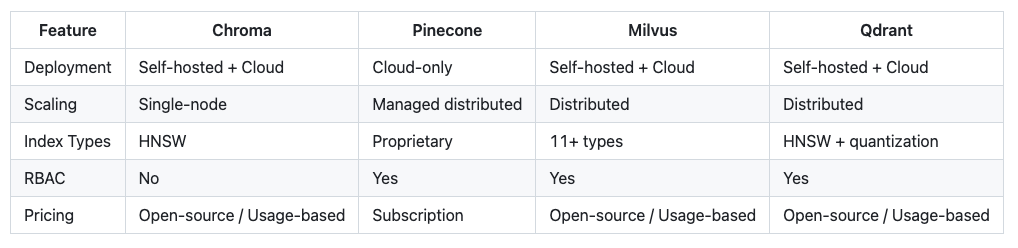
Chroma differentiates through developer experience and zero-configuration setup. Production requirements determine whether this trade-off fits your context.
Resources and Documentation
- Official Documentation: docs.trychroma.com
- GitHub Repository: github.com/chroma-core/chroma (22k+ stars)
- Chroma Cloud: trychroma.com
- Cookbook Examples: cookbook.chromadb.dev
- Python Package: pypi.org/project/chromadb
- JavaScript Client: npmjs.com/package/chromadb
History suggests that enduring technologies share a quality: they make previously difficult things simple without hiding the underlying power. The relational database did this for structured data. Git did this for version control. The Chroma vector database aspires to do this for AI-powered search and retrieval.
For developers building the next generation of intelligent applications, Chroma offers something valuable—a foundation that works today while the field continues its rapid evolution. The best tool is often the one that lets you focus on your actual problem rather than the infrastructure surrounding it.




Leave a Reply